Time Management Apps
1. Todoist
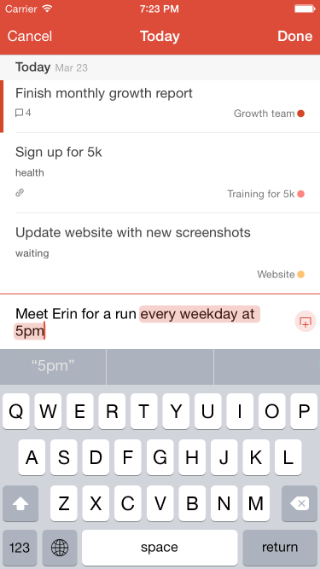
- Todoist is an excellent tool for organizing due dates and listing items to be completed. A point system is incorporated within the app to help the user engage in completing task. Todist would be an excellent tool to incorporate into a online classroom platform. Educators can use this tool as a point system by giving extra credit to students who complete assignments on time. A detailed schedule is created displaying up to seven days of things to do. It's so detailed to the point that an actual time stamp can be added daily to ensure that important dates are highlighted. Photo credit: Todist
2. Be Focused Timer
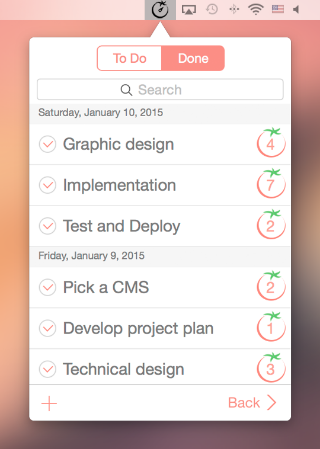
The Be Focused Timer organizes work into sections and keeps up with work history. For example, it helps with managing obligations, goal settings, and skills and task needed to be completed, thus increasing productivity. It features cool graphs that are beneficial to the visual learner. Photo credit: Be Focused Timer
3. Focus Booster
- According to Leslie Ye, Focus Booster also uses the Pomodoro Technique model for tracking work, but provides a deeper dive into exactly where your time is going. When the user is aware of how his day is progressing needed changes can be made to increase productivity . The user can link revenue, meetings, and projects to your Pomodoros so you gain a birds-eye view of the impact of your work (Leslie Ye). Focus Booster takes away excuses of not completing task and places responsibility on the user. This app also incorporates visual graphs.
- Photo credit: Focus Booster

4. Kiwake App
Kiwake is an alarm clock app that encourages the user to move. For example, movement is rewarded when the user exits from the bed in the morning. Physical stimulating games are incorporated to help the user examine personal goals. This would be a nice app for Physical Educators to promote to their classes. Teachers can create a graph that displays the students who are moving the most. This may encourage other students to move more. Photo credit: Kiwake
5. Loop - Habit Tracker
To increase productive in the workplace Loop was created to help the user form better work habits. Once a goal is created the app will create actions to repeat daily thus replacing bad habits with effective habits that occur naturally. According to research habits are formed within three weeks of continuous behavior. Couldn't we all improve our lifestyle and become more fit. Loop is an app I definitely would like to try. Photo credit: LoopWorks Cited:
Ye, Leslie. “13 Time Management Apps That Will Make You More Productive.” HubSpot Blog, blog.hubspot.com/sales/time-management-apps.
- Which app would you consider using that may not be on this list?


Comments
Post a Comment